 Prepful
The by-hand method
Works with paper, a notes app, or a spreadsheet.
Pick the recipes for the week and decide how many servings of each you will make.
Scale each recipe to those servings, then write every ingredient from every recipe on one list.
Combine lines that are the same ingredient in the same form, converting units first so you add like to like.
Shop your kitchen: cross off anything you already have enough of.
Round each line up to what the store sells, such as one can, one bunch, or one pound.
Group what is left by store section so you walk each aisle once.
Step 3 is where most lists go wrong
Two recipes that each call for "1 onion" should become "2 onions" on your list, not two separate lines you might read as one. But only merge ingredients that really are the same thing. These look alike and are not:
- Garlic cloves and garlic powder
- Chicken breasts and chicken thighs
- Crushed tomatoes and tomato paste
- Red onion and yellow onion
- Salted butter and unsalted butter
- Fresh cilantro and ground coriander
When the same ingredient shows up in different units, convert before you add. The ones that come up most in recipes:
- 3 teaspoons = 1 tablespoon
- 16 tablespoons = 1 cup
- 2 cups = 1 pint, and 4 cups = 1 quart
- 16 ounces = 1 pound (weight, not fluid ounces)
If one recipe measures by weight and another by volume, such as 200 g of cheese and 1 cup shredded, keep them as two lines with a note. Guessing the conversion is how you end up with half the cheese you needed.
Buy in store units, not recipe units
Recipes ask for "2 tablespoons tomato paste" and "¼ cup parsley". Stores sell cans and bunches. Before you leave, rewrite each line as what you will actually put in the cart. This is also when you notice overlap worth planning around: if one recipe uses half a bunch of cilantro, a second recipe that uses the other half saves the rest from wilting in the fridge. We wrote more about that in why you keep buying the same groceries.
A worked example: three dinners, one list
Say the week is chili, chicken tacos, and veggie fried rice, each made for 4. Here is what the recipes ask for, line by line, and what that turns into once you combine and convert.
| Ingredient | Chili | Tacos | Fried rice | On the list |
|---|---|---|---|---|
| Yellow onion | 1 | 1 | 2 onions | |
| Garlic | 3 cloves | 2 cloves | 2 cloves | 7 cloves (1 head) |
| Cumin | 1 tsp | 2 tsp | 1 tbsp | |
| Chili powder | 2 tbsp | 1 tsp | 2 tbsp + 1 tsp | |
| Ground beef | 1 lb | 1 lb | ||
| Chicken thighs | 1½ lb | 1½ lb (a separate line from the beef) | ||
| Crushed tomatoes | 28 oz can | 1 large can | ||
| Cilantro | ¼ cup | 1 bunch | ||
| Green onions | 3 | 1 bunch | ||
| Eggs | 2 | 2 (you may already have them) |
Three things happened. Matching lines were added up (2 onions, 7 cloves of garlic). Small units were converted before adding (1 tsp + 2 tsp of cumin is 1 tbsp). And recipe amounts became store amounts (¼ cup of cilantro means buying a bunch). Then shop your kitchen: cumin, chili powder, and eggs are often already there, which takes three lines off before you leave. If a recipe serves 4 and you are cooking for 2, halve its column first, before any of this.
Which tool should you use?
Any of these works. The difference is how much of the adding up you do yourself.
| Tool | Adds up repeats | Scales servings | Sorts by aisle |
|---|---|---|---|
| Paper or a notes app | You do it | You do it | You do it |
| iPhone Reminders (Groceries list) | You type each item | You do it | Yes, as you type (iOS 17 or later) |
| A spreadsheet | With a SUMIF formula, once units match | With a multiplier column | Sort by an aisle column |
| Prepful | Yes, from the recipes you plan | Yes, to the servings you plan | Yes: Produce, Protein, Dairy, and more |
On iPhone, a Groceries list in Reminders is a good free step up from paper: tap Add List, set the list type to Groceries, and it files each item under a section such as Produce or Frozen Foods as you type. You still read the recipes and do the math yourself, so it pairs well with the by-hand method above.
The faster way: let your meal plan write the list
In Prepful, the shopping list is built from the recipes you plan. There is nothing to copy.
Save your recipes to Prepful from a link, TikTok, Instagram, YouTube, Facebook, or a photo of a cookbook page.
Open a recipe, tap Add to Plan, and pick the days you will cook it.
Open the Shop tab. Every ingredient from the week is there, with repeats combined into one line and amounts scaled to the servings you planned.
Check items off as you shop. The list is grouped into Produce, Protein, Dairy, Grains, Pantry, Spices, and more, or you can view it by recipe.
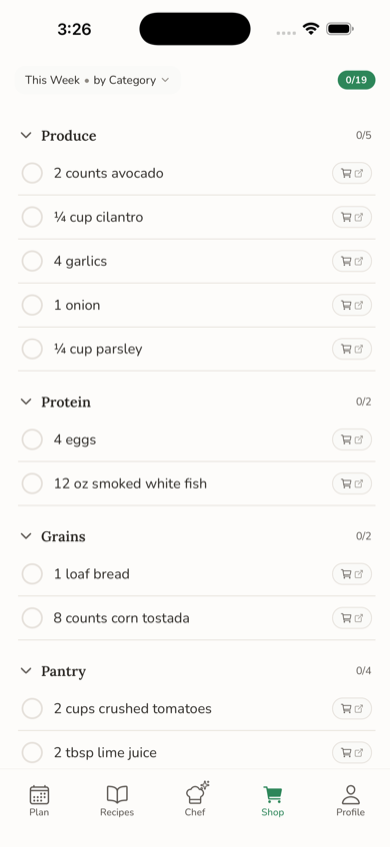
Change the plan and the list follows. Swap Thursday's dinner and its ingredients come off the list while the new ones go on. Give the list a quick read before you go, the same as you would a handwritten one, and cross off what is already in your kitchen.
What Prepful does to the list for you
- Adds up repeats across recipes. The same ingredient in two recipes becomes one line, with amounts scaled to the servings you planned.
- Converts units that go together. Teaspoons, tablespoons, and cups are added as one amount, and so are grams, ounces, and pounds. A can and a tin count as the same thing.
- Keeps volume and weight apart. When one recipe says 1 cup and another says 200 g, the line reads "1 cup + 200 g" so nothing gets guessed.
- Leaves off what you never buy. Water, salt, black pepper, and lines like "oil, as needed" stay off the list.
- Shows where each item came from. Switch the view from category to recipe to see what each dinner needs.
- Takes your own items too. Type paper towels or coffee into Add an item. Long-press one to move it to the right aisle, and Prepful remembers that aisle next time.
- Starts fresh each week. Uncheck All clears your checkmarks, and the list you already loaded still shows when your phone is offline in the store.
Three mistakes that break a grocery list
Skipping servings. A recipe that serves 4 does not feed 6, and scaling after you shop is too late. Adding mismatched units. "1 cup plus 200 g" is not a number, so convert or keep separate lines. Forgetting the staples. Oil, rice, and spices are not in any one recipe's spotlight, so check they are not running low before you go.
Used Mealime for its automatic grocery list? Mealime shut down on October 21, 2026. See our Mealime alternative guide for how to move your recipes. Not sure which recipes to pick? See how to meal plan with the recipes you already saved. Want a finished example? Here is a week of dinners for two with one combined list. Still collecting recipes first? Start with saving from TikTok or saving from any website.