 Prepful
Your browser's own ways to save a recipe
Nothing to install. Each one keeps the page, not the recipe.
Bookmark it. Fast, and every browser has it. You still land back on the full page with the ads, and if the blog moves or deletes the post, the bookmark goes nowhere.
Add it to Safari's Reading List. On iPhone, tap Share, then Add to Reading List. It's a tidy "read later" pile, but it's a list of pages, mixed in with every article you meant to read.
Print it or save it as a PDF. Most recipe cards have a Print button that strips the page down to just the recipe. Choose Save as PDF instead of a printer and you have a clean copy that won't disappear. It's a file, though, so you can't search it by ingredient or turn it into a shopping list.
Take a screenshot. Quick, but the ingredients and steps rarely fit on one screen, and the screenshots get lost in your camera roll.
| Method | Skips the ads and story | Survives a deleted post | Goes on a shopping list |
|---|---|---|---|
| Bookmark or Reading List | No | No | No |
| Print to PDF | Yes, if the site has a print view | Yes | No, you copy it by hand |
| Screenshots | Partly | Yes | No |
| Prepful | Yes, just ingredients and steps | Yes, the recipe is saved as text | Yes, scaled to your servings |
Save it as a recipe: share straight from your browser
The fastest way, no copying or pasting.
Open the recipe page in Safari, Chrome, or any browser.
Tap Share in the browser.
Choose Prepful from the share sheet.
Prepful pulls out the ingredients and steps, ready to save or cook.


First time on iPhone? If Prepful isn't in your share sheet yet, tap More, then Edit, then tap the green + next to Prepful. On Android, Prepful is already listed there, no setup needed.
Paste the link
Works the same everywhere, including the web version on a computer.
Copy the recipe link from the address bar.
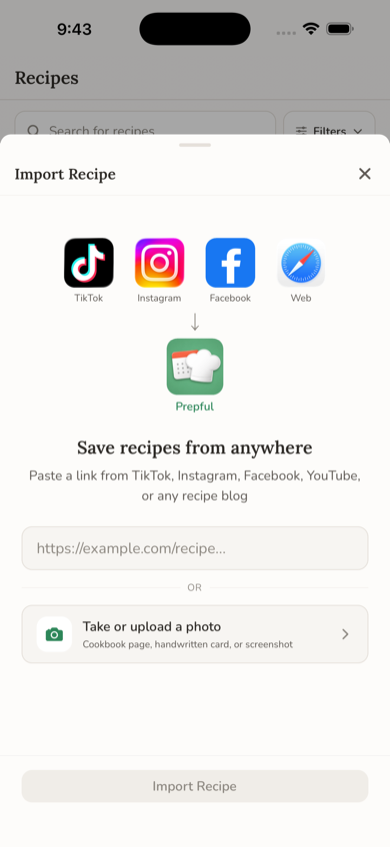
Open Prepful, then go to Recipes > Add > Import a Recipe.
Paste the link and tap Import Recipe.
Review the recipe, then save it to your library.
What Prepful keeps from a recipe page
The recipe, and nothing around it.
Ingredients with their amounts, and the steps. If the recipe splits ingredients into groups, like the dough and the filling, the groups come through too.
Servings, prep time, and cook time when the site lists them, plus the recipe's photo.
A link back to the original. The saved recipe keeps the author and the page it came from, so you can check the blogger's notes or comments, and they still get the visit.
Ingredients ready for your shopping list. Put the recipe on a day this week and its ingredients go onto your list, scaled to the servings you planned and combined with everything else you're cooking.
Why it works on almost any recipe site
Most food blogs and recipe sites tuck a machine-readable copy of the recipe into the page, the same data Google uses for recipe cards in search results. Prepful reads that first, so the amounts come straight from the recipe itself rather than from the text around it. When a page doesn't have it, Prepful reads the page's text and picks out the recipe instead.
Some big recipe sites turn away automated visits. When that happens, Prepful checks the Internet Archive for a public copy of the same page and imports the recipe from there. It only does this for public pages, never for private links.
When the recipe won't come through
Two fallbacks for pages that don't import cleanly.
Copy the text, then paste it. Select the recipe on the page (the print view makes this easy), copy it, then in Prepful go to Recipes > Add > Paste a Recipe. Include the title, the ingredients, and the steps.
Upload a screenshot. Screenshot the ingredients and steps, then go to Recipes > Add > Upload a Photo. You can add up to 6 screenshots for one recipe. More in how to save recipes from a photo.
Then actually cook it
Saving is the easy part. Put the recipe on a day this week and it joins your shopping list with everything else you planned. See how to meal plan with the recipes you've saved, how to make a grocery list from recipes, and how to organize your recipes once the collection grows.
If it doesn't work
A few things stop an import: the page needs you to sign in (a members-only recipe box or a private document), the recipe is only an image on the page, or the link is broken. Try the copy-and-paste or screenshot fallbacks above. Got the recipe from social media instead? See saving from TikTok, Instagram, YouTube, or Facebook.
Curious how Prepful compares to other recipe-saving apps? See Prepful vs Paprika and Prepful vs Copy Me That, which also import from recipe websites.