 Prepful
Facebook's own ways to save a recipe
Built into the app, nothing to install. Each one keeps the post, not the recipe.
Save the Reel or post. Tap the three-dot menu on the Reel, video, or post, then Save reel, Save video, or Save post. Everything you save lands in Saved (Menu, then Saved in the app, or facebook.com/saved on a computer), and you can group saves into collections like "Dinners to try". It's still a list of videos you'll have to rewatch for the amounts.
Download the Reel. Facebook's download option is for Reels you shared yourself, and only in the phone app. For someone else's recipe Reel, the usual workaround is a screen recording, which gives you a video file with the amounts still wherever the creator said or typed them.
Screenshot the post. Fast, but it ends up in a camera roll full of screenshots, and a long post or a "see more" caption takes two or three.
| Method | Keeps the amounts | Survives a deleted post | Easy to find later |
|---|---|---|---|
| Facebook Saved | Only inside the post | No | Scroll your Saved list |
| Screen recording | Only what's said or shown | Yes, as a video | Somewhere in your camera roll |
| Screenshot | Yes, as a picture | Yes | Somewhere in your camera roll |
| Prepful | Yes, as a written ingredient list | Yes, the recipe is saved as text | Search your recipes by name |
Save it as a recipe: share directly from Facebook
The fastest way, ten seconds, no copying or pasting.
Open the Reel, video, or post with the recipe in the Facebook app.
Tap Share. If Prepful isn't in the row of options, look for More options or Other apps to open your phone's share sheet.
Choose Prepful from the share sheet.
Prepful reads the post text, and the audio when the text is short, to pull out the ingredients and steps.


First time on iPhone? If Prepful isn't in your share sheet yet, tap More, then Edit, then tap the green + next to Prepful. On Android, Prepful is already listed there, no setup needed.
Paste the link
Works the same everywhere, including on a computer.
Tap Share on the Reel or post, then Copy link.
Open Prepful, then go to Recipes > Add > Import a Recipe.
Paste the link and tap Import Recipe.
Review the recipe Prepful pulled out, then save it to your library.
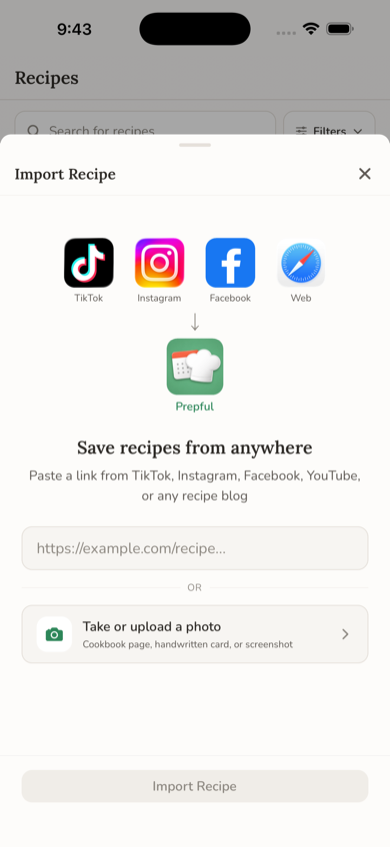
Works with Reel links, video links, short fb.watch links, the share links Facebook copies to your clipboard, and public posts.
What Prepful keeps from a Facebook Reel or post
Everything lands as text you can read and search.
The post text, and the audio when it matters. Prepful reads the caption or post text first. When it's short, Prepful also listens to the video, so amounts that are only said out loud usually make it into the ingredient list.
The photo and a link back. The saved recipe keeps the post's picture, the creator's name, and the original post as its source, so you can jump back to rewatch a tricky step.
Ingredients ready for your shopping list. Add the recipe to a day this week and its ingredients go onto your shopping list, scaled to the servings you planned.
When the recipe is in the comments, a link, or a photo
Three common Facebook cases, and what to do with each.
"Recipe in the comments." Prepful reads the post, not the comments. Open the comments and look for the creator's reply. If it's a link to their website, save that page instead: website recipes usually have exact amounts, and the creator gets the visit. See how to save recipes from any website. If the recipe is typed out in the comment, copy it and use Recipes > Add > Paste a Recipe.
A link post to a recipe site. Tap through to the website and save the recipe page itself.
The recipe is written on the photo. Prepful reads the post text and audio, not words inside the picture. Screenshot it, then go to Recipes > Add > Upload a Photo and add up to six screenshots at once. More in how to save recipes from a photo.
Recipes from Facebook groups
Recipe groups are where a lot of the best home cooking on Facebook lives, but most of them are private. Prepful can only read what's public, so a link to a post in a private group won't import. Copy the post text instead (press and hold the text, or open the post on a computer and select it), then paste it into Recipes > Add > Paste a Recipe. You get the same written ingredient list, and the shopping list works the same way.
Then actually cook it
A saved recipe only helps if it makes it onto a plate. Put it on a day this week and it joins your shopping list with everything else you planned. See how to meal plan with the recipes you've saved and how to make a grocery list from recipes.
If it doesn't work
A few things stop an import: the post is private, shared with friends only, or in a private group; the recipe is never written or said anywhere in it (a finished-dish photo with "recipe in comments"); or the post has been removed. If a link fails, check that the post is public and actually contains a recipe. You can always copy the text and paste it in Recipes > Add > Paste a Recipe.
Saving from other apps too? See how to save recipes from Instagram, TikTok, and YouTube, or compare the best apps to save recipes from social media.