 Prepful
TikTok's own ways to save a recipe
Built into the app, nothing to install. Each one keeps the video, not the recipe.
Add it to Favorites. Tap the bookmark icon on the right side of the video. To find it again, go to your Profile and open the bookmark tab. Depending on your version of TikTok, you may be able to sort favorites into collections.
Save the video to your phone. Tap Share, then Save video. This option only appears if the creator allows downloads, and the file that lands in your camera roll is the video alone, without the caption.
Screenshot the caption. Tap "more" to expand the full caption first, then take a screenshot, plus one of the comment if the creator posted the ingredients there.
| Method | Keeps the amounts | Survives a deleted video | Easy to find later |
|---|---|---|---|
| TikTok Favorites | No, you rewatch to get them | No | Scroll a grid of thumbnails |
| Saved video | Only what's spoken or on screen | Yes | Buried in your camera roll |
| Caption screenshot | Only what's in the caption | Yes | Buried in your camera roll |
| Prepful | Yes, as a written ingredient list | Yes, the recipe is saved as text | Search your recipes by name |
The catch with all three: the recipe is still locked inside a video or an image. When you're standing in the kitchen, or at the store wondering how much ginger to buy, you're scrubbing back through a clip instead of reading a list. Saving it as a recipe fixes that.
Save it as a recipe: share directly from TikTok
The fastest way, ten seconds, no copying or pasting.
Open the TikTok video with the recipe.
Tap the Share arrow.
Choose Prepful from the share sheet.
Prepful pulls the ingredients and steps from the caption and video, ready to save or cook.


First time on iPhone? If Prepful isn't in your share sheet yet, tap More, then Edit, then tap the green + next to Prepful. On Android, Prepful is already listed there, no setup needed.
Paste the link
Works the same everywhere, including on desktop.
Tap Share on the video, then Copy Link.
Open Prepful, then go to Recipes > Add > Import Recipe.
Paste the link and tap Import Recipe.
Review the recipe, then save it to your library.
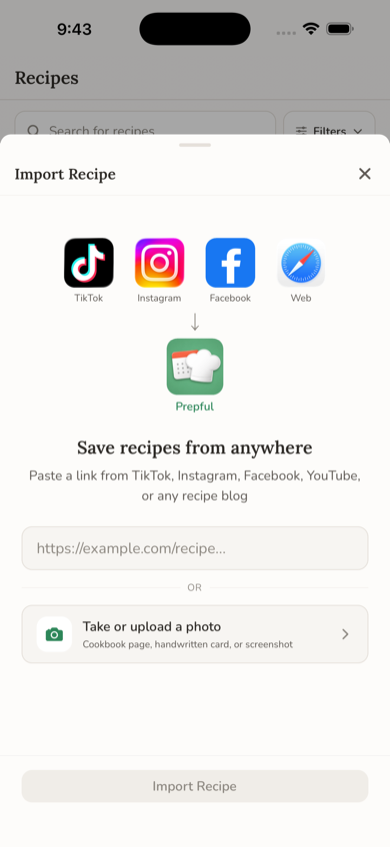
Works for TikTok Photo Mode posts too, not just video.
What Prepful keeps from a TikTok
Everything lands as text you can read and search.
The caption and what's said in the video. Lots of creators only say the amounts out loud. Prepful reads the spoken words as well as the caption, so those amounts usually make it into the ingredient list.
A link back to the creator. The saved recipe keeps the original TikTok as its source, so the creator still gets the credit and the view when you want to rewatch a step.
Ingredients ready for your shopping list. Add the recipe to a day this week and its ingredients go onto your shopping list, scaled to the servings you planned.
When the recipe is in the comments or a screenshot
Two fallbacks for posts that don't import cleanly.
Copy the text, then paste it. If the full ingredient list is in a comment, copy it, then in Prepful go to Recipes > Add > Paste a Recipe. Prepful turns the pasted text into ingredients and steps.
Upload the screenshot. Already took a screenshot of a caption? Go to Recipes > Add > Upload a Photo and pick it from your camera roll. More on that in how to save recipes from a photo.
Then actually cook it
A saved recipe only helps if it makes it onto a plate. From any saved TikTok recipe you can add it to a day this week, and its ingredients go straight onto your shopping list, combined with everything else you planned. See how to meal plan with the recipes you've saved and how to make a grocery list from recipes.
If it doesn't work
A few things stop an import: the account is private, the video doesn't actually name ingredients or steps anywhere (just a finished-dish shot), or the video's been taken down. If a link fails, check that the account is public and the recipe is genuinely in the caption or video, not just implied.
Curious how Prepful compares to other recipe-saving apps? See Prepful vs ReciMe, the closest match on import platforms.